
Connecting a Model
Imza talks to OpenAI-compatible endpoints and the Anthropic Messages API,
including models you host yourself. Open the connections screen at any time
with /connect. To connect external tool servers instead, see
MCP servers.
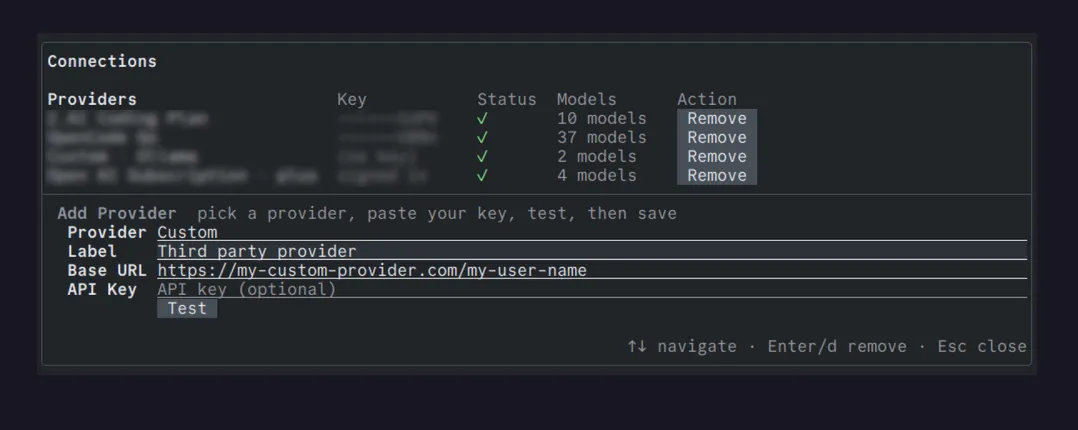
A connection needs two things: a credential and an endpoint. Most providers
take an API key, which you paste into /connect. A few are different, and
Exceptions covers those.
API keys live in your OS keychain, not in
config.json. On a machine with no keychain service, Imza keeps them inconfig.jsonfor that run and warns you at startup. To choose that storage deliberately and silence the warning, setpreferences.credentialstoplaintext. See Credentials.
Connecting via API Key
This is the path for every hosted provider and for a model running on your own machine.
In the Add Provider section of /connect:
- Provider: type to search the built-in catalog and press Enter. This
covers OpenAI, Anthropic, and the rest of the catalog. For a server that is
not listed, choose Custom; a Base URL field appears, for example
http://localhost:1234/v1. Imza strips a trailing/chat/completionspath. - Label: an optional name that tells apart two connections to the same
provider, for example
my Ollama. It is required when the provider is already connected, and it cannot contain/. - API Key: your key, masked in the list. Leave it empty for endpoints that need no key, such as a local server.
- Test: checks the connection and fetches the model list. Once it shows
✓ <N> models, the button becomes Save.
Existing connections appear at the top with a status (✓ ready, ✗ failed,
⟳ fetching), the masked key, and the model count. Press DEL on a row to
remove it, then confirm with y. The last connection cannot be removed.
Keyboard: ↑↓ navigate, Enter or DEL remove, Esc close, Ctrl+R
refresh model lists.
Local Models and Custom Endpoints
Choose Custom in the provider picker to reach any OpenAI-compatible server, including one on your own machine. Enter the base URL and leave the key empty if the server needs none.
Imza sends OpenAI Chat Completions to a custom endpoint. A URL ending in
/responses uses the Responses API instead. If the first request fails with
an API error, Imza retries the other dialects. It remembers the one that
worked for that connection and model, so later turns start on it.
Subscription Sign-in (OpenAI)
Pick the subscription entry in the provider picker and the API key field is replaced by a sign-in pane. Imza requests a device code and shows it with the full verification URL, so a remote SSH session can open the link by hand. The URL is also a clickable hyperlink where the terminal supports it. Imza opens the page in your browser and polls until you approve, or until a fifteen minute limit expires.
Credentials are stored on the connection and refreshed automatically before they expire. Use a different Label to sign in with more than one account.

Amazon Bedrock without a key
Bedrock works two ways. Paste a Bedrock API key into /connect and Imza sends
it as a bearer token, like any other provider. Or leave the key empty and Imza
signs each request with SigV4 using the machine’s own AWS identity. This is
the same pattern as OpenAI sign-in: no long-lived secret is pasted anywhere,
the credential comes from where the machine already keeps it.
With the key empty, Imza looks up credentials in this order:
AWS_ACCESS_KEY_IDandAWS_SECRET_ACCESS_KEY, plus the optionalAWS_SESSION_TOKENAWS_WEB_IDENTITY_TOKEN_FILEandAWS_ROLE_ARN, as on Kubernetes pods with IRSAAWS_CONTAINER_CREDENTIALS_RELATIVE_URI, as on ECS and EKS tasks
If none of these resolve, the request fails and Imza shows the error instead
of sending it unsigned. Set AWS_REGION to pick the region; it defaults to
us-east-1.
Exceptions
Four providers run in your own cloud tenancy. They take an API key like any
other provider, but Imza builds their endpoint from an environment variable
instead of a fixed address. Export the variable in the shell that starts
Imza, then add the provider in /connect as usual.
| Provider | Export |
|---|---|
| Databricks | DATABRICKS_HOST, your workspace URL |
| Azure OpenAI | AZURE_RESOURCE_NAME, the resource name |
| Cloudflare Workers AI | CLOUDFLARE_ACCOUNT_ID |
| Amazon Bedrock | AWS_REGION, optional, defaults to us-east-1 |
The API key still goes in the connections screen, and Imza stores it in your keychain. For Bedrock that key is a Bedrock API key, not an access key pair. Imza sends it as a bearer token. To authenticate with the machine’s own AWS identity instead, see Amazon Bedrock without a key.
These four providers have no model-listing endpoint, so their model list comes from the built-in catalog. Test still sends a real one-token request, so a key the provider rejects fails instead of being saved.
If a variable is unset, the connections screen names it and refuses to test.
When Testing Fails
| What you see | What it means |
|---|---|
Missing DATABRICKS_HOST, or another variable | Export that variable in the shell that starts Imza, then restart it. |
401, invalid api key, authentication | The key is wrong, expired, or belongs to a different account than the variable names. |
404, not found, model isn't supported | The variable points at the right host, but the region, resource, or workspace has no such model. |
403, permission | The key is valid and lacks access to the model or workspace. |
| Connection refused, or a timeout | The host in your variable is unreachable. Check for a typo, a private endpoint, or a firewall. |
The message is the provider’s own wording, so it is the most reliable clue. A
wrong model name causes most 404s, and a key copied from a different
workspace causes most 401s.
Choosing the Active Model
/model opens the model picker. It lists every model from all your
connections, filterable by text, with the provider, model id, and context
window where known. Your current model is tagged · current at the top. Press
Enter to switch. Embedding, speech, and image-generation models are hidden.
Reasoning Effort
/variant <effort> sets the reasoning effort sent with each request: off,
low, default, or high. The active effort shows in the status line next
to the model name.
Imza translates the effort into what your provider and model support, and omits the fields they do not.
Your model and variant choices persist to the providers and models
sections of your configuration file. Override them for one run with
imza --model|-M <model> or --variant|-V <variant>.
See Configuration for the keys and how reasoning effort is applied, and the command line reference.