
Permissions
The Permission Model
Imza asks before doing anything potentially destructive, and remembers approvals for the session. It is an approval and policy layer, not an operating-system sandbox: it does not make arbitrary shell behavior safe or isolate processes from the rest of your machine. Treat approvals the way you would treat running a command yourself.
Three separate decisions:
- Runtime flags decide whether a tool exists at all this run
(
--web false,--shell false, attended vs. headless). The configcapabilitiessection sets defaults (web,subagents); a command-line flag wins for that process. - Session mode applies Plan/Build restrictions.
- Permission policy accepts, asks about, or rejects the specific
request.
capabilities.subagentscaps the tasks one subagent call may delegate (0 disables delegation); internal runs such as review passes and session titles are not limited by it.
A grant cannot re-enable a disabled tool or override a mode restriction. Malformed requests fail closed, and every request is re-checked immediately before execution.
Filesystem Rules
- The trusted roots are the enclosing Git repository root (or the working directory when there is no repository) and Imza’s private temporary directory.
- Reading inside trusted roots is automatic. Editing and writing
there are automatic in
Buildmode only. - Access outside the trusted roots asks, unless a directory grant already covers the target. Approving one grants that directory and all descendants for the session.
- Sensitive files never inherit access. A path with a
.gitpart or a secret-bearing name (.env,.env.*,*.pem,*.key,id_rsa*,id_ed25519*,id_ecdsa*,id_dsa*,credentials*,.git-credentials) asks for approval even inside the trusted roots or an approved directory, and only an approval naming that exact file accepts it. Approving one sensitive file grants that file alone, so neighboring secrets keep asking. - Listing and searching are read-only discovery and allowed for any valid target.
- Deleting a file or an empty directory always asks for approval, even
inside the trusted roots, and is only available in
Buildmode. - Approving a single-file request installs a grant for its parent directory, so siblings stop asking too.
- Loading a skill makes its own folder readable for the session, so the skill’s scripts do not need a second approval. Writes there follow the rules above.
- Connecting an MCP server asks every time; there is no session-wide MCP approval.
- Paths are normalized and symlinks resolved before checks, so lexical
bypasses (
link/../../../etc/passwd) do not sneak through.
Shell Rules
- Each platform ships a catalog of common inspection commands that run
without approval, plus read-only command/subcommand pairs (
git status,npm ls,docker ps, …) with their allowed flags. - A catalog entry knows which operands are safe, so
git remote -vandgit stash listrun whilegit remote add origin …,git branch <name>,git tag <name>, andgit config <key> <value>ask. - Options that make a program read other configuration or run another
program always ask, even with a grant:
git -c …,--exec-path,--config-env,--git-dir,--work-tree.git -C <dir>and--no-pagerstay allowed. - Anything not covered (a mutating flag like
git branch -D, an operand likegit remote add, output redirection, or unrecognized syntax) asks. - Deleting commands (
rm,rmdir,del, …) are refused outright, even with a grant. The agent removes files through its own tool instead, so every deletion stays visible and goes through the permission check. - Approving a command typically grants that command/subcommand pair. Later approval of the same program with a different subcommand proposes a whole-program grant, which covers every subcommand and replaces narrower grants for that program.
- Compound commands (
a && b,a; b, pipes) must be fully covered before any part runs; approving one installs all required grants atomically. - A redirect that writes a file (
> out.txt,>> log,2> err) and dynamically composed commands can never produce reusable grants; they ask on every execution. Discarding output (2>/dev/null) or duplicating a stream (2>&1) writes nothing, so those commands still run without approval. - Shell commands touching secrets always ask. Any command whose text
names a sensitive path (
cat .env,openssl x509 -in cert.pem) asks on every execution, even when the program itself is catalog-accepted or granted, and the approval is never remembered as a command grant. - Wrapping a command does not change its verdict. Wrappers like
env,sudo,nice, andxargsare peeled off and the program they invoke is classified, soenv FOO=x lsis still accepted. Shell launchers (sh/bash/zsh -c,cmd /c,powershell -c) have their code re-analyzed, sobash -c 'ls | grep x'is still two commands andbash -c 'rm -rf x'is still a deletion. A launcher whose code cannot be read (an interpreter likepython -c, orbash script.sh) asks every time and never earns a grant, because a grant naming it would authorize every command it can run.
Persistent Grants
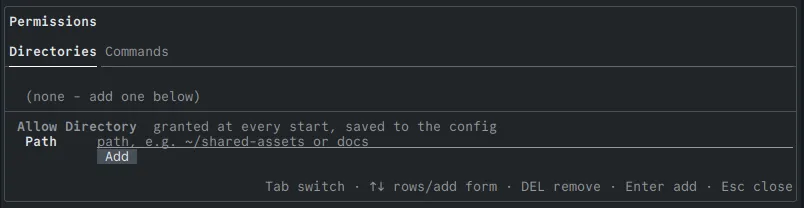
Grants you approve during a session are forgotten when it ends. /permissions
manages the persistent allow list. It shows the granted directories and
commands, adds a directory by path or a command by its command line, and
removes entries. An addition is saved to the config and takes effect
immediately; a removal is saved and takes effect on the next start. The
dialog applies the same rules as --allow-cmd; only inspectable, reusable
commands become grants, and deletion programs are refused outright.
Navigate with ↑↓, Enter adds the entry in the form, DEL removes the
selected row after a confirmation, Tab switches between directories and
commands, and Esc closes.
The dialog edits the same allow section of config.json that you can
edit by hand with imza --config (see
Configuration); the two stay in sync:
{
  "allow": {
    "directories": ["/home/me/notes", "scratch"],
    "commands": [
      { "program": "rg" },
      { "program": "git", "subcommand": "push" }
    ]
  }
}directoriescovers each directory and everything beneath it. Paths can be absolute, or relative to the directory you start Imza in. Entries that no longer exist are ignored rather than stopping startup.commandsnames a program, optionally narrowed to one subcommand. Omit thesubcommandfield to approve every subcommand of that program, just as approving them one by one eventually would.
These grants are loaded at startup alongside --allow-dir and
--allow-cmd; they authorize exactly what they name.
Approving in a session stays in memory; only what /permissions saves (or
what you add under allow yourself) persists.
Grant Lifetime
Grants last for the current chat session and working directory and are cleared when you start or open a different session, successfully change directory, or exit. Active grants are visible in the side panel.
Skipping Approvals
--skip-permissions automatically accepts ask-decisions for this
process only, without storing grants. Hard restrictions (disabled
tools, Plan mode, malformed requests) still apply. Headless runs have no
approval frontend at all. See
Headless mode for
pre-installing grants.
/auto flips the same switch while the app is running: /auto toggles
it, /auto on and /auto off set it explicitly. While approvals are
skipped, the input box shows an auto badge so the state is visible
without opening the side panel.