Sessions
Every conversation is a session; sessions persist automatically and can be restored later.
What Is Saved
| Saved | Contents |
|---|---|
| Transcript | User and assistant turns, tool calls and results |
| Todos | The agent’s task list |
| Documents | Every revision of the plan document, plus build logs and handoff reports |
| Compaction | The compacted-context summary and how many items it covers |
| Mode | Plan or Build |
| Title | The generated session title |
| Usage | Totals and the per-request usage log |
| Workspace | The working directory the session belongs to |
Runtime-only state is never saved: permission grants, the /undo history,
running subagents, pending modals, and interrupt state start fresh on
restore. Provider credentials and preferences live in configuration, not in
sessions.
One-shot runs (--ask / --exec) save their transcript under the data
directory’s unattended/ folder instead; those files never join the session
index. See
Headless mode.
In the TUI
- Exiting Imza saves the session automatically, then lists recent sessions.
/sessionsopens the session manager:↑↓choose,Enterload,DELdelete (with confirmation),Escclose./newsaves the current session and starts a fresh one./cd <path>switches the working directory mid-session. It rescans instructions, skills, and repository state, and clears session grants. Aliases:/dir,/chdir,/directory.- Loading is refused while the current session still has pending work. Finish or interrupt first.
- Loading a session switches to its saved working directory; a workspace path that no longer exists falls back to the current directory.
From the Command Line
imza --session ls            # list saved sessions
imza --session <id>          # open a session by ID
imza --session rm <id>       # delete a session
Restoring switches to the session’s saved working directory unless you
pass a directory argument. --session <id> combines freely with the
headless flags.
See Headless mode.
Storage
Sessions live in the platform data directory (see Configuration) behind a cross-process file lock, so concurrent Imza instances cannot corrupt each other’s data. A background-loaded session index keeps listings fast.
A session is written when it has at least one item and has changed since the last save. An empty session, or one that was just restored and not touched, is not rewritten.
Analytics
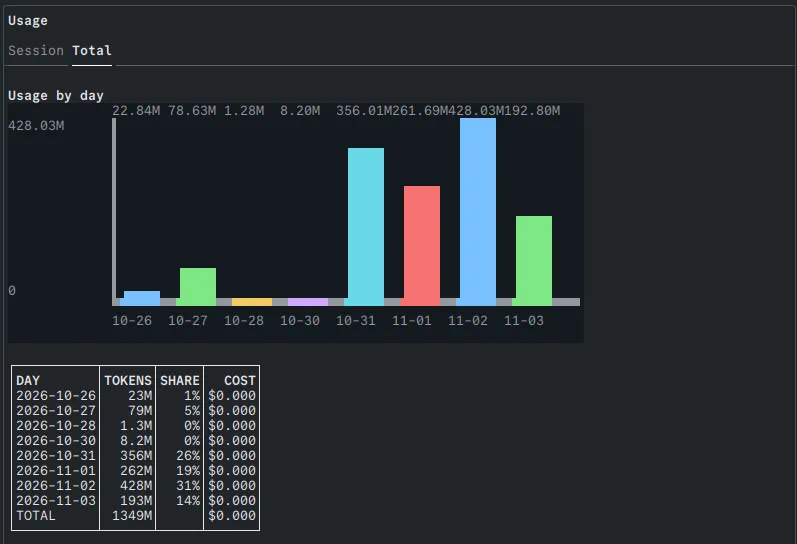
/usage opens a spending dashboard: a per-day chart of tokens by model,
per-model tables, and totals, for this session alone or for all saved
sessions combined. The Session and Total tabs switch between them.